A Prayer for Our Parish Building and Renovation Project
Loving God, we come before you with hearts full of gratitude for the many blessings you have bestowed upon the Saint Aloysius Parish family.
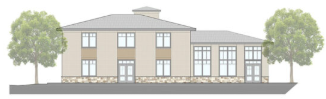
As we near the completion of our parish building and renovation campaign, we seek your wisdom and blessing.
Inspire our hearts to be generous and selfless, reflecting your boundless love.
Grant us the continued vision to imagine a future that will glorify your name and give us what we need to proclaim the Gospel of your Son, Jesus Christ.
May our efforts strengthen our Church, making it a beacon of faith, hope, and love for generations to come.
Fill us with evermore courage to move forward in faith, trusting that with you, all things are possible.
Bless each member of our parish and all who have given of their time, treasure, and talent to bring us closer to reaching our goal.
Through the intercession of Saint Aloysius Gonzaga, our patron, and Blessed Carlo Acutis, for whom our chapel will be named, grant us zeal to serve you and our brothers and sisters in love and in truth.
We ask this through Christ our Lord. Amen.
– Monsignor Rob